Headless Content Management Systems (CMS) explained

With the introduction of Headless CMSs, a lot of companies have started switching from traditional CMSs to more lightweight versions. This shift is very evident in the world of ecommerce where a number of high-profile brands have started using headless CMSs as the base for their online stores. However, some online store owners are not aware that some shopping cart plugins can be used as headless content management systems. In fact, it’s quite possible that some of your favourite ecommerce platforms are already using headless CMSs behind the scenes. In this article, we explore what headless content management systems are and how they work.

What is a Headless CMS?

A headless CMS is a back-end only approach to website development. It doesn’t rely on a user interface or traditional CMS front-end tools to manage content. Instead, it provides an API for developers to build flexible, dynamic web applications that can interact with data stored in the CMS’s database. A headless CMS may include a web interface for managing other aspects of the site, such as users and permissions, but this is a secondary feature and not a replacement for the API.

The term “headless” refers to the separation of content from presentation. When you use a traditional CMS, you create pages by building files with tags that correspond to the elements on those pages. In short, you describe how your content should be presented to visitors. In a headless CMS, you simply store those pages as data in the CMS’s database. It’s then up to you to interpret that data and present it in whatever way makes sense for your application or website.

A headless CMS has three parts:

  1. A storage layer
  2. A web service or API for accessing content
  3. An application server or web browser.

The storage layer holds all the content. In a traditional CMS, this is a database. In a headless CMS it can be any data store, from files on disk to NoSQL databases like MongoDB and Redis to remote services like Amazon S3.

The web service or API exposes that content to the application server or web browser. This provides a standard way for the front end to get at the content.

The application server takes that content and displays it to users via HTML, JavaScript and CSS files. And while it’s possible for developers to do everything from the command line, the usual approach is to use frameworks such as React, Angular or Vue.

The pros and cons of a headless CMS

A headless CMS is a great option if you’re looking for an out-of-the-box workflow that will free you from the restraints of a traditional content management system. In a nutshell, a headless CMS is an application that allows you to store and manage your data in a database, use a well-established programming language to interact with your data, and render your content through a user interface.

A headless CMS allows you to develop your front-end application (UI) with any framework/library you want without the need to install any more components on your server.

In a typical CMS, content is stored in a database and delivered to the front-end application via a web service. In a headless CMS the content is delivered directly from a storage layer to an application server or web browser. The headless approach offers many advantages for developers and businesses, but there are some gotchas that lead organisations to choose traditional CMS architectures instead.

Advantages There are four main reasons why companies choose to use headless CMS:

1. Access to Content
Using an API gives you full access to all content within the CMS. You can change, update or delete any content within the system, enabling you to fully control your content and data.

2. Faster Development
A headless CMS allows developers to build applications with ease. This means that development teams can work on new features and functionality much quicker than if they were using a traditional CMS.

3. Scalability
Since there is no front-end interface, building websites becomes much faster as developers do not have to worry about creating multiple versions of their site for various devices. This also makes it easier to scale up.

4. Faster Page Loads
With headless CMS, the data is stored on the back end of your website so that only the front end needs to retrieve it each time it needs to load a page or post. This means that pages load faster which translates into happier visitors and higher search engine rankings.

Disadvantages

  1. A content management system that is not integrated into the front end can be difficult to manage and edit by designers and nontechnical users.
  2. The API can be cumbersome to work with and does not lend itself to quick edits. Some developers believe that there is no need for a separate API and prefer the simplicity of editing the same files as both back end and front end scripts.
  3. Headless content management systems often sacrifice design for functionality by not providing an interface for designing pages and sections of pages. It will require a Designer/Developer on hand for bespoke templates and design changes.

Conclusion

Headless CMS’s can provide more features than traditional CMS. It’s also much more scalable and secure. It’s also much easier to distribute the same content via multiple platforms, whether that may be an App, or across other media platforms.

If you require a similar solution please Contact Us.

Why Storytelling is Good for Marketing your Business?

One of the most popular trends in modern marketing is story telling. But why? What’s so special about using stories to break down your product offering and unique selling proposition that makes it better than all of the other options out there?

Why does storytelling matter?

Well, it’s just one of the most effective tools for marketers to capture the attention of people. The idea is that if you are able to speak to customers with stories, then they are more likely to listen.

Tell your story

Storytelling is an art form. It has the power to inspire action and ignite change within people’s hearts and minds.

Ninety-five percent of all communication is non-verbal. Storytelling uses words to paint a picture in the minds of those listening to really engage their attention. This is why storytelling is so powerful it allows you to bypass the logic centres of your customers’ brains and virtually transport them into your story.

One of the reasons storytelling is such a powerful tool for selling is because it gives customers permission to buy from you. It builds trust, gives customers confidence in your brand, and lets them know you’re someone they can relate to and trust with their money. By giving your customers a glimpse into who you are and how you came up with your idea or product, they’ll feel like they know you and will be more likely to make a purchase from you.

Storytelling is not just for sales pages – it can be used on all of your marketing materials as well as on social networks, videos, press releases, etc. In fact, storytelling should play a key role in every aspect of your business from naming your company to designing

Make the story relatable

Every business has a story to tell, and telling that story is critical to branding. If you’re not running an online business, you may not be aware of this yet, but branding is one of the most important aspects of marketing your business. You can have the best product or service in the world, but if people don’t know about it, they will never buy it. That’s why branding is so important; you want people to recognise your brand immediately and associate it with the positive feelings they get when they think about your product or service.When it comes to branding, storytelling is one of the most powerful tools available. Many companies already use stories effectively in their marketing materials, but they often fail to use them appropriately. They may tell a story that has nothing to do with their products or services or they may tell irrelevant stories that detract from the message they are trying to send. These kinds of mistakes can lead consumers to feel confused and unimpressed by what they see on your website.

Effective storytelling doesn’t just help you connect with potential customers on an emotional level; it can also help drive sales, build trust with customers and improve your search engine rankings.

Be consistent in how you tell your stories

Storytelling is the newest marketing strategy, but it’s also an ancient one. It’s about creating a compelling narrative, and there are many ways to tell your story. You can write a book, hire a publicist to write an article about you in Forbes or create a video on YouTube. These are content marketing tactics that can be effective in getting people to know, like and trust you.What they all have in common is that they’re different forms of storytelling that help you relate to people on an emotional level. This makes them more memorable and inspires action from the audience.The key is to be consistent in how you tell your particular story. If you’re going to write a book, mention your book in every other piece of content you release. If you’re going to do video interviews, talk about how your product or service relates to what the interviewee does for a living. That way, people will get used to hearing your name and start associating it with your product or service instead of thinking of it as a random occurrence.

Give yourself time to get better at it

Storytelling is an art which can be mastered with practice. We are all storytellers, but it is one of the finest qualities of human beings. Storytelling enables us to learn about the world around us, to educate each other and to make sense of things that we experience.

The thing is, storytelling isn’t something that just happens. It takes time and effort to get good at it, but here are three things you can do today to start practicing your storytelling skills:

Listen to other people’s stories. You don’t have to pay attention while you’re doing this; just keep tabs on the story while you’re doing something else. Think about how it makes you feel while you’re listening and try to figure out why that feeling occurs.This will help give you some insight into what makes a good story work and how you can apply that knowledge when telling stories yourself.

Businesses that are great storytellers are more likely to attract customers, media coverage, business partners, investments and more.

Google Shopping Vs Google Ads: Which One is For You?

If you’ve found yourself asking this question then you’ve come to the right place. While it may seem simple enough to answer, there are a lot of intricacies that you should know first. The two platforms are often compared, which is no surprise considering they’re both under the Google umbrella. With one being the direct competitor of the other, it’s important for you as an advertiser to understand how both platforms operate.

What’s the difference between Google Ads and Google Shopping?

Google Shopping and Google Ads (formerly known as Google AdWords) are 2 different products under the same Google umbrella. Both products allow you to promote your product to customers through paid advertisements. Although they both advertise on Google, they serve slightly different functions and target slightly different customer bases.The major difference between the two is that Shopping ads appear when a customer is specifically searching for a product or service, while Adwords appear when a customer is casually browsing through unrelated content. Because of this, when someone searches for a product using Google Shopping, they have been exposed to either your search engine optimisation efforts or your display advertising efforts.

Here are a few things to keep in mind:

Google Ads appear beside relevant content in search results pages and on partner sites in the Google Display Network. You’ll also have access to advanced targeting options, such as remarketing lists and demographic information.

Google Shopping appears when people do specific online searches related to your products. You can bid on keywords for items that match your products. The cost per click (CPC) for shopping ads generally tends to be lower than Adwords’.

In addition to these differences, there are also a few similarities between the two products:You can control how much you would like to spend per day and also adjust the CPC which affects your positioning of where you will appear on Google’s listing.

So which one is for you?

Google Shopping is better for product listing ads.
Google Ads are better for paid search keywords.

Google Shopping is great if you’re an online retailer with lots of product inventory to sell, but it’s not so great if you’re a small business owner running an online store with only a handful of products. Or maybe you’re not in business yet? You may have some products you’d like to sell in the future. That’s where Google Shopping ads come in handy. They allow you to set up your ads in advance so when you’re ready to start selling, all you have to do is turn them on.

Google Ads is a more viable solution if you sell higher-cost items or services. It also lets you target potential customers based on their demographics and interests. You can focus on places where your ideal customer lives and works, down to the Post code level, which lets you target specific markets and locations.

If you require assistance in initial setup or management of your Google Shopping or Google Ads account please Contact Us.

Keep Emailing: Email Marketing Is Still Reliable and Effective

You might see a lot of email marketing and think it is ineffective. But email marketing still remains the one of the most effective marketing strategy to date.

Why email marketing is important

From sending emails to your list of contacts to sending out mails to new leads, email marketing is a vital part of any business’ success online. It’s so important, in fact, that many companies and marketers rely on email marketing as their main source for leads and sales. Email marketing is still the best way to reach your audience directly. It’s cost-effective and easy to track. And it really is the best way to get your message across because it doesn’t require people to leave their inboxes or remember passwords or enter their credit card numbers.

It’s also flexible. Email marketing can be used as a one-to-one communication channel for special offers or announcements or as a broadcast channel that goes out to multiple users at once. Email marketing is great for building relationships with existing customers, too, which can lead to repeat business and referrals down the line.

Recognise why people are using email less

Email is no longer the “go to” marketing channel that it once was. However, many businesses are still using email as their primary marketing channel for Facebook, Facebook Live and Instagram. But not everybody is using email in the same way, so it’s important to recognise why people are using email less.

To start with, it’s important to recognise that different people use email differently. The key influencer for how someone uses email is their age.It is no surprise that the younger generation are using email much less than other generations. Research shows that Millennials use email up to 60% less than their predecessors did at the same age.

Instead of using it for sharing ideas and collaborating on projects, they prefer using instant messaging apps such as WhatsApp or iMessage on a smartphone or technology such as Dropbox for collaborative projects.

This makes sense when you consider that the majority of them have grown up with smartphones and therefore have become accustomed to new ways of staying in touch with friends and colleagues online. In addition, they aren’t motivated by money in the same way as previous generations were, so they prefer social media platforms where they can share information freely.

Your email list is your army, train them

Think of your email list as your army. It’s the most loyal bunch of people who are there to back you up during your business journey. They will be there to support you and buy from you when you’re launching a new product, running a new promotion or even just need to vent out your frustration.

You can never take this group for granted because if they feel neglected, they may abandon you and then where would that leave you?

So how do you keep them engaged? How do you keep them on your side? You send them useful and relevant content on a regular basis. Updates about new products, tips and tricks, giveaways and so on can keep them excited about what’s happening in your business.

But there’s always the risk that some of these subscribers might accidentally end up in the spam folder, which is why it is important to make use of opt-in forms such as pop ups and double opt-in whenever possible.

Also, consider using an autoresponder service that allows you to schedule content in advance so that your subscribers won’t miss any information from you.

One more thing: try not to bombard them with emails too often (no more than once per week).

Make sure you’re getting good open and click through rates

The key to making your email marketing profitable and sustainable is to make sure you’re doing it right.

Here are some tips:

Optimise your subject line. This is the first thing people see when they open their inboxes, so it needs to be compelling and eye-catching. Keep it short and sweet, and include as many keywords as possible.

Make sure you’re getting good open and click through rates. If people aren’t opening or clicking your emails, then they aren’t helping you sell anything! Focus on ways to improve those numbers before moving forward with your campaign.

If you’re not doing it already, start building your email list today!

Email marketing is still one of the most effective channels of communication. You can reach a large audience at relatively little cost. In fact, email marketing is still the most effective channel for ROI, with a 3500% return on investment. What’s more, over 90% of adults check their email every day. Whether you’re sending out a message or simply responding to someone who has responded to your email, there’s no better way to increase your sales than through email marketing.

If you would like to start sending email campaigns, or require assistance with your existing campaigns Contact Us.

Free Search Engine Advertising with Google Ad Grants

Google Ad Grants is a Google program that gives non-profits up to £7000 per month in search ads shown on Google.

What is google ad grants?

Google Ad Grants is a program that allows non-profits to get free ads on Google searches.

It is available in the following countries: Australia, Belgium, Canada, France, Germany, Ireland, Italy, Japan, South Korea , Netherlands, Spain, United States, and the United Kingdom. To be eligible for the program you need to meet the following criteria: You are an incorporated non-profit or charitable organisation.

  • Organisations must be currently registered with tt-exchange, TechSoup Global’s regional arm.
  • Organisations must be registered with or recognised by relevant authorities as: (1) registered charities; or (2) HMRC exempt charities or churches.

You use ads only to raise money for your cause; Your ads must comply with all applicable laws and Google policies; You are not barred from accepting Google advertising by any laws applicable to you; Your organisation does not have an overdue debt to Google; You aren’t currently in bankruptcy proceedings; You agree to comply with their ad policy guidelines.

How does it work?

Google Ad Grants is a program designed to help non-profits and charities connect with their target audience at no cost. It allows eligible organisations to receive a portion of the advertising revenue from clicks on ads displayed on their websites, in addition to free Google AdWords credit. Eligible organizations in the United Kingdom can apply to become an Ad Grant partner and if accepted, will be able to claim an Ad Grant each month.

More information can be found at: https://www.google.co.uk/grants/

Why are Reviews for Your Website Important?

Online reviews are an essential part of any online marketing strategy. In fact, a whopping 80% of customers read reviews before they purchase.

Reviews from past customers or clients can help you reach new prospect or users. As a website owner, all you want is people who love your product. Website reviews are the best way to get this.

Reviews for your website are important because they provide you with social proof.

SSocial proof is very important as it shows potential customers who may be hesitating to buy that another person has taken a risk and had success. Because of this, you see so many companies with 5 star reviews on Trust Pilot, Reviews.io, Yelp, Google etc, giving off the impression that their business must really be great.

It’s important to build a reputation because people are more likely to do business with you if they trust you. And the way to earn that trust is by getting reviews for your site as it makes people less hesitant to purchase from you.

Here are 3 reasons why it’s smart to get reviews for your website:

  1. Reviews will help you rank higher in the search engines. Google values customer feedback. It has been proven that having an average rating of 3.5 or higher can help your site rank higher in the search engines. The more positive reviews you have on your site, the better it will help you rank in Google results.
  2. Reviews will help you reach potential customers through social media channels. If visitors read positive reviews about your site, they are more likely to share it with their friends and followers on social media and this will increase traffic and sales to your website.
  3. Reviews create a sense of urgency and drive sales. Today’s customers want information immediately. They turn to review sites like Google+, Trust Pilot and Reviews.io to see what other customers have experienced in regards to making a purchase from your or the service they experienced from your business.

How to get reviews for your website?

An effective review program has the potential to drive a lot of traffic, build your brand and generate sales. But getting people to leave reviews can be a challenge. To encourage your customers to leave reviews, consider these five tips:

  1. Find out who your best customers are and reach out to them.
    The best way to get reviews is from happy customers. Who are they? The ones that have been with you from the beginning when you were just starting out? Or the ones that have been with you for a while but haven’t left a review yet? Find out who your best customers are and reach out to them. Ask for a review! If you have a newsletter, reach out in there. If you don’t have a newsletter, send out a personalised email or make a phone call.
  2. Give away something in exchange for leaving a review.
    Giving away something in exchange for leaving a review can be controversial because it could be construed as an attempt to buy reviews but there’s no question that it works!Give something of value away for free in exchange for leaving an online review about your business.

If you would like us to setup a Reviews system for you and/or integrate your Reviews into your website please Contact Us.

The Ultimate Guide To Writing a Good Web Brief: A guide to help you understand how to create a good web brief.

There is a lot of discussion in the web industry about who does a web brief and when. Is it done in-house? Is it done by a design agency? Does strategy have anything to do with it or is it just a tool for project management?

Creating a website brief

A website brief is a document that details a website’s structure, design, content and functionality. It is a detailed breakdown of a client’s requirements or expectations for a website. Identifying the main objectives of the project and outlines, key messages that the client would like to convey through their website.

When writing a brief there are many things to consider from the client’s viewpoint as well as from the designer’s viewpoint. In this article I will discuss how to write a good web brief.

How to know what you are looking for

There are two main things you need to know before you start writing a brief. The first is the purpose of your brief. For each piece of work you commission, there should be a reason it’s being made and an overall objective that’s driving the entire project. The purpose is typically communicated through a strategy document, which sets out all your objectives, or aims.What are your aims? What are you trying to achieve with this project? Why are you doing it?

How to set your website goals

Setting your website goals is important for measuring your site’s success. You can set your goals by making a list of desired outcomes.

Your website goals should be specific, measurable, attainable, relevant and time-bound.

Having a clear idea and vision of the things that you want to achieve, you can start setting up manageable goals for yourself.

It is very important to be realistic when setting up these goals. You should define clear action steps and define time frames for each of them. For example, if your business goal is to increase revenue by 20% in the next 6 months, then break down this goal into smaller chunks such as increasing it by 5% in the first month and another 3% in the second month etc.

When setting up a goal, make sure that it is measurable. This will allow you to know when your goal has been achieved or not.

For example, if your website goal is to increase traffic on your website from 1000 visitors per month to 5000 visitors per month, make sure that this goal is measurable so that once it has been achieved, you will be able to track it easily through statistics or other available means of tracking. Also make sure that this goal can be tracked.

Common mistakes people make when they write web briefs

The web brief is not just an opportunity to sell. It’s also an opportunity to for your Agency to learn about your Business and your project. The best briefs are not too prescriptive, but they do give a clear understanding of what you’re looking for and what the end result should be.

The following are a few things to avoid when writing a web brief:

Being too prescriptive – If you’re asking for a specific format for the site, make sure you understand the reasoning behind it. Keep it simple and outline the issues you are having or the real problem, this gives your Agency to offer you a valid solution.

Too much text – It’s tempting to go into great detail in your web brief, but it can often be better to keep it short and sweet. Not only does this mean that there’s less reading on your part, but it also gives the client room to ask questions and offer further suggestions.

Excluding key information – This is a common mistake with web briefs. Make sure that you include as much information as possible so that you give them a good understanding of how you work. Explain your USP and any other unique workflows you have in your business which could be relative. An agency should be an integrated part of your business so being open and honest about the details is essential.

Writing a good web brief

A web brief is an essential part of the website development process. It describes everything that should go into your website, and all the various elements. The web brief is like the blueprint to the entire site, and it’s vital to get this right.

The web brief sets out clearly what your requirements are for your new website, and ensures that the designer fully understands what you want. It also acts as a guide so that there are no nasty surprises down the line when it comes to building your new site.

To take the effort out of writing a Web Brief, we have put together a Project Planner enquiry form. By answering the questions in as much detail as possible gives us a good starting point of your requirements for your next project.

Looking for a new Website or Redesign? Head on over to our Project Planner.

How to retain SEO value When Launching a New Site

When you’re launching a new site or redesigning your current website. It’s easy to get excited about the latest design trends as well as the visual aspects that make up the redesign. You’ve spent months planning , developing, and tweaking your site. Now, you’re finally ready to go live with it. But before you hit publish, there is one more thing you can do to ensure your new site has SEO value…

…update your existing site using 301 redirects.

Launching a new site is always a bit of a scramble.

There are so many things to do, and not much time to do them in. If you’re lucky, you have time to plan ahead, but sometimes that’s just not the case.

Here are some tips for what to do when you have limited time available to launch your site:

Get your development team involved early. If you’re launching a new product or service, it’s critical that you have people on hand who can help develop or design your site. That might seem obvious, but it’s surprising how many companies skimp on the budget for this part of the process, and then have to scramble at the last minute due to lack of resources.

Building the development team early gives them time to get familiar with your product and come up with an effective solution for its website. It also gives them time to make suggestions and recommendations about how your site should be designed and laid out. Once you are aware of their suggestions, it can be easier to make changes to your plans based on their input.

Gather content early involve a copywriter and editor if required at an early stage of the project. If you’re planning on having lots of copy on your site. Information pages explaining how your product works, what makes it special and who it’s aimed at are key to getting the right message across.

What happens when you launch your new site?

Launching a new website is one of the most exciting things that can happen to you as a business owner. You have worked hard for months or even years on that site, and you are finally ready to see it in action.

The launch itself can be very hectic, but it’s also very important. It’s the first impression of your brand, product or service that you give to your visitors. If you don’t make the right impression, the customer may never come back.

Website redesigns have a big impact on search results, but not just because of changes to the code. Changes to your site’s look and feel also change the user experience, which can have a direct impact on traffic and other SEO factors. To ensure that your new site launch has as little negative impact as possible on your rankings, here are some best practices:

Inform users about changes. If you’re changing the look and feel of your site, include a message on your homepage letting users know what’s going on. The message should appear as soon as they arrive.

Reorganise pages. If you’re combining or reorganising pages, make sure search engines know about it by using 301 redirects. Google will have indexed your old website and structure, so and will remember that for a while.

Redirects tell Google that a page has moved to a new address, redirecting those old links and search results to point to the new valid information.

301 Redirects – What They Are and Why You Need Them

As far as SEO is concerned, they’re essential for anyone making any kind of change to their site – whether it’s a content update, a change in URL structure, or a site redesign.

When done properly, they’re completely invisible to the end-user – but they’re vital for ensuring that your site continues to rank well in search engines.

The idea behind this type of redirect is to send any and all traffic coming from a specific page, post, category or other kind of web content to another page. For example, if you were to change your URL structure and move all your blog posts to a different directory, the 301 redirect would ensure that any visitor who tried to access the old blog URL would be automatically directed to the new directory. That way you can keep all your old SEO juice flowing to the new directory without losing any visitors.

How do I setup 301 redirects?

Setting up 301 redirects for your website can be done manually, but if you run an off the shelf system such as WordPress there are many plugins available to help you.

If you are using Apache server software you simply need to edit the .htaccess file and add the following code for individual pages.

Redirect 301 /oldpage1 /newpage1.html

Redirect 301 /oldpage2 /newpage2.html

The examples above used to point to folders on the website while the new path to the page is now a .html file.

If you require assistance with your redirects or a website redesign please Contact Us.

Google site speed test with the Google Page Speed Insights

You can use a site speed test to measure the performance of your website. Google has developed their own tool called Page Speed Insights. It analyses your website and gives you recommendations on how to improve your website’s loading times.

So what is Google Page Speed Insights and what are the advantages?

The Google Page Speed Insights tool is a free web application provided by Google which will help you to optimise your website’s loading speed.

It measures the performance of any given webpage and provides suggestions on how to improve it. The test results are based on following criteria: First Contentful Paint (FCP) – time at which main content of page appears; DOMContentLoaded (DCL) – time when document has been parsed; Load (time), aka “Time to Interactive” – moment when browser can handle user input such as mouse clicks or taps; Perceptual Speed Index, an estimate for human perception of load times in seconds; TTI Success Rate, %age of successful loads where Time-to-Interactive.

You can use any site speed test to measure the performance of your website. But Googles tool will analyse and give you recommendations on how to improve your website’s load time. In this article we’ll take a look at what the tool is about, and provide some quick tips on how to get started with it! There are a few things to note before you get started with Page Speed Insights.

Why is it important to check Google PageSpeed?

Google recommends a fast website as it is taken into consideration for their Mobile friendly rankings and algorithm. They consider this essential for your SEO strategy.

The other cost is for UX reasons, the time it takes your users to load web pages. Users may be on a slow connection and want quick access to information. You should aim for as fast loading speed possible.

How does it work?

Google Page Speed Insights will give you suggestions to improve your site’s page speeds such as:

– Minifying code (reducing file size)

– Leveraging browser caching

– Optimising images (compressing them down without sacrificing quality)        

– Use Google Analytics data from real user monitoring tools like New Relic and Calibre       

– Serve scaled images instead of resized ones when necessary        

The Page Speed Insights tool is only available for websites that are publicly accessible, so you need to make sure that your pages are not password protected or within a closed area. There is an alternative which is part of the Google Chrome browsers “Developer Tools” called “Lighthouse” and can be run from any webpage.

This can be a password protected page in a closed area or even a page you are running locally which no-one else can access. It does however rely on your local computer resources and can differer considerably if you have lots of windows open so is best to run in an “Incognito” window on its own for a more accurate test.

  1. Getting a base score

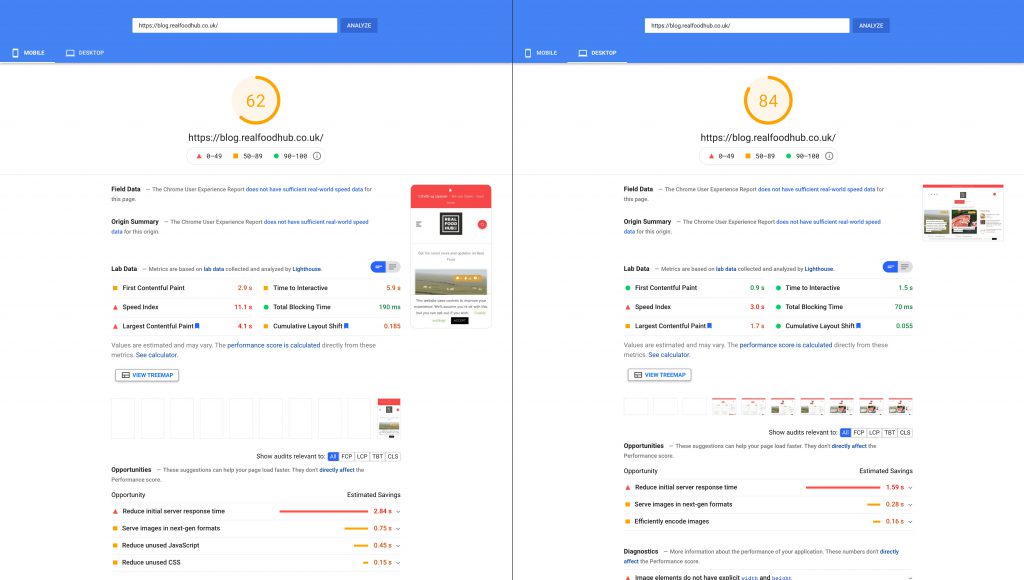
First we ran it through PageSpeed Insights to get a base score rating to see what we were up against.

Desktop 84 and Mobile 62

We started with quite a good score, this was due to to us already implementing a few things as part of our usual process, such as minifying stylesheets & javascript, enabling text compression, server caching and long life caching on static assets, such as images, and script files.

On the summary screen the Key things to look at are the Main score rating at the top. The “Lab Data” gives you a good overview of where your issues lie. Probably the most important area to take notice of are the “Opportunities” list. The “Opportunities” list are the elements we need to improve upon to improve our score.

A very useful tool is the “Calculator”, click the “See calculator” link and it allows you to adjust the sliders regarding each task. You can then see which adjustments affect the total score the most. This can be useful if you are limited on time but wish to concentrate on the key elements to get the biggest score gain.

The images have been flagged as an issue. The first task for us was to optimise the images by reducing the file size and remove any unnecessary metadata.

At the same time we looked into reducing the unused Javascript and unused CSS. We also pulled in the CSS to load inline and deferred any unnecessary Javascript on initial load. This would improve the initial response times, as external scripts take longer to initiate

We then ran the test again and we got the following results.

2. Second Run

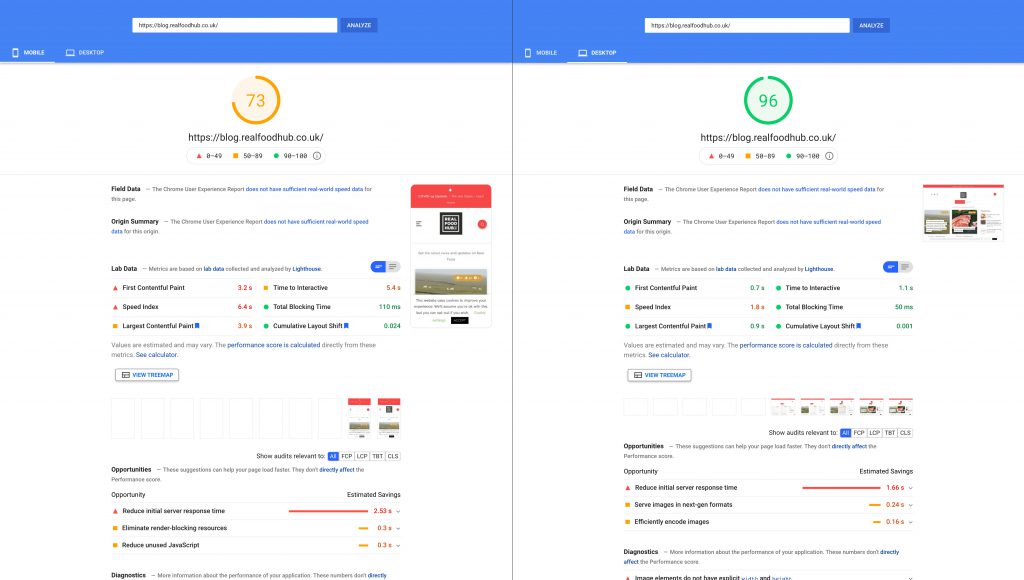
Desktop 96 and Mobile 73

Quite a considerable jump and the lovely score in “Green” gives you that satisfaction that you’ve achieved a goal.

We still had a few “Opportunities” to improve upon so we kept working through the list.

Our images had improved greatly from the reduced size but “PageSpeed Insights” still recommended that we convert them to a next gen format such as “WebP and AVIF“.

AVIF is the new kid on the block which is based on the AV1 video codec. It can fit high quality images in an even smaller file sizes than WebP. It’s still quite new, so browser support can be an issue. Processing speeds seem to be slower than WebP. We think that over time as browser development moves forward, speeds will improve. So for now we made the decision to stick with WebP. We created a WebP conversion of all image assets, but also kept the original image files as a fall back. To ensure incompatible browsers would then default to the original image format.

We ran the test again with the following results.

3. Final Results

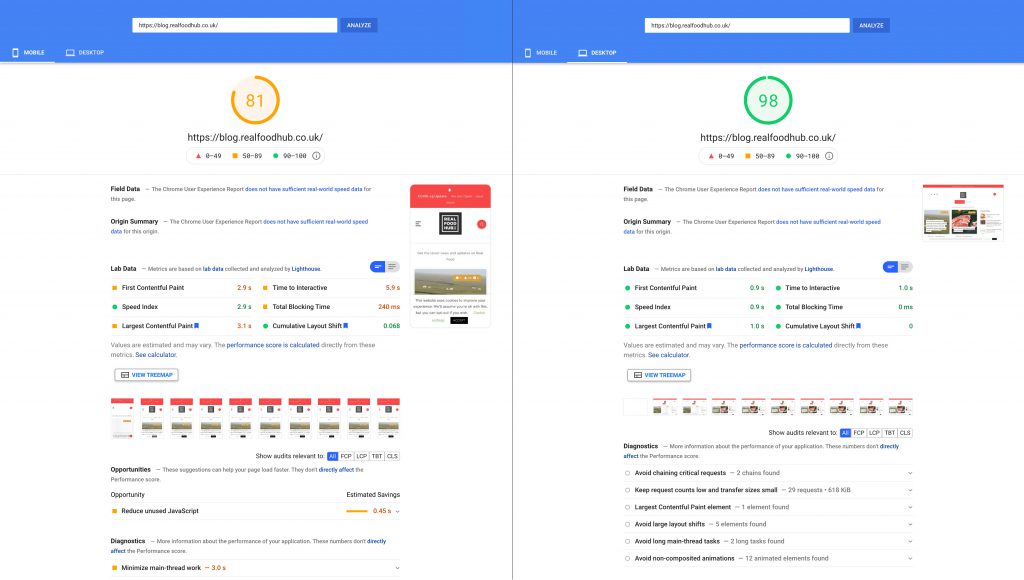
Desktop 98 and Mobile 81

We were pleased with the result, it’s not a perfect score but you have to realise that in reality its very difficult to get a perfect score. When you have page with a considerable amount of content with images and other scripts running through it.

It’s easy to have a perfect score on pages with small amounts of copy and minimal style as theres nothing to load. In the real world, pages with a reasonable amount of content on the page with images will struggle to get a perfect score. Consideration must also be taken in balancing the User Experience along with optimising the score as some of the Page Insight recommendations can put a negative effect on your UX.

Our takeaways are that 98 is a brilliant score for the Desktop view and 81 is very good for the Mobile view. The main point is that the Largest Contentful Paint loads in 3 seconds on mobile.

If you require assistance with your website speed, please Contact Us.

What are Google Rich Results? and why do they Matter?

You might have come across the term “Google Rich Results” but are unsure what they actually are. Or maybe you’ve seen rich snippets in search results and wondered how to create them. Well, read on! Rich results are Google’s way of extending the search result capabilities. A good analogy is having a picture inserted over plain text, or adding more information onto that . It allows website owners to present their site, product or provider data in ways that people will find more relevant.

So how are Google Rich Results different from regular results? They are basically the same results as before, but are now presented in a richer, more visual format.

Rich results are the enhanced listings appearing in search results when using Google search. These are different to regular search results because they also include images, have tighter integration with social media, are easily accessible through mobile-optimized preview pages, and are more prominent. Rich results are used to display things like Geo pins, events calendars, business listings, starred reviews, places of interest, video content and more.

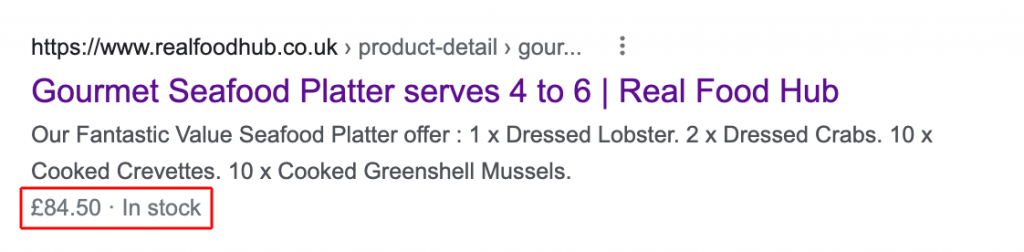
Below is an example of an Ecommerce website where we have integrated “Google Rich Results” markup, for a product page.

Hilighted in red is the Rich content, in this case it shows the price of the product and showcases that the product is “In Stock”

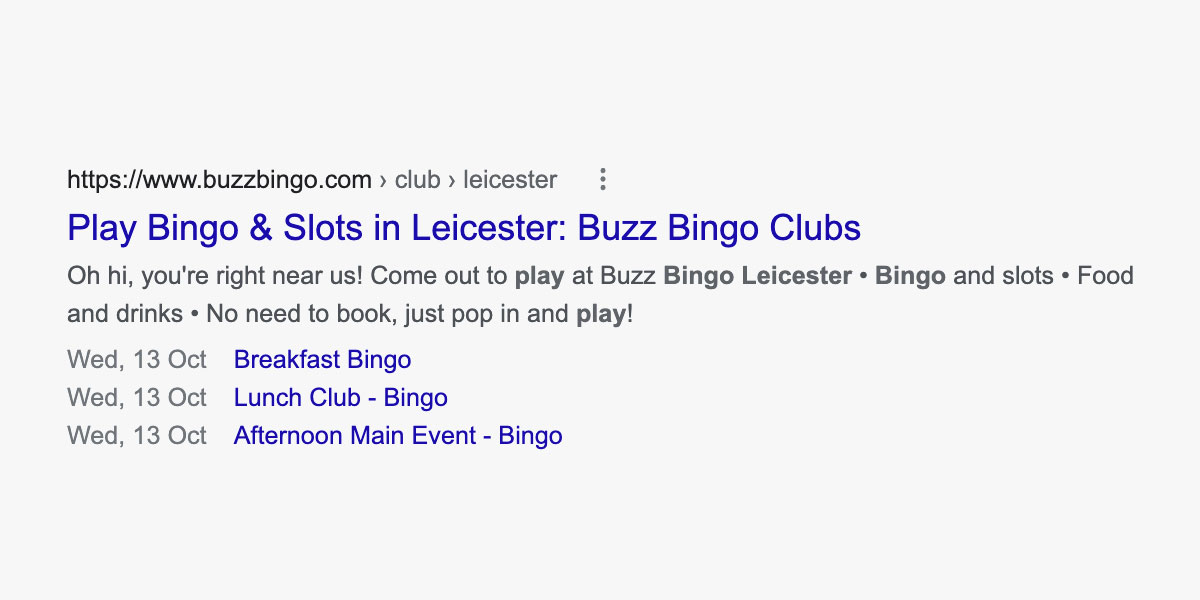
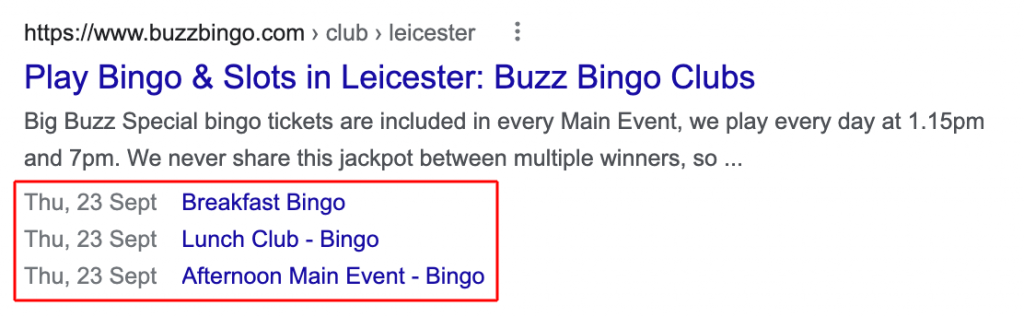
Another example above which we implemented for Buzz Bingo, showing the next available Events for their Club in Leicester.

What are the advantages of Google Rich Results?

I imagine you are wondering what Google rich results are and whether or not you should be trying to get your web pages to display as such?

The Rich snippets allow your listings to stand out from the regular results. This can increase the chance of someone visiting your page or allow them to realise that your page isn’t the right one for them. The positive of giving the user this extra information helps to reduce your bounce rates as it makes it more relevant to the user.

Is my current website already running Google Rich Results?

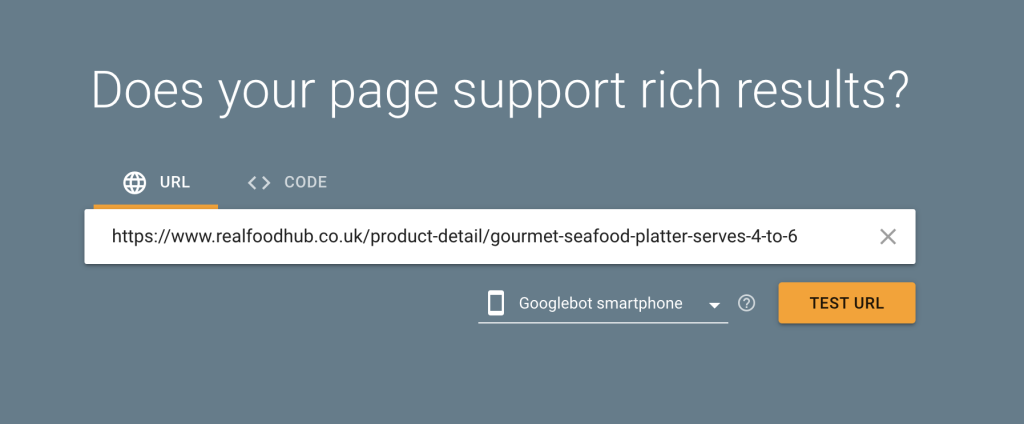
So you’re probably wondering how you can check whether your existing site is already running Rich results. Google have a search tool which allows you to check specific pages of your website for Rich results: https://search.google.com/test/rich-results simply enter your page url into the input field then click “Test URL”

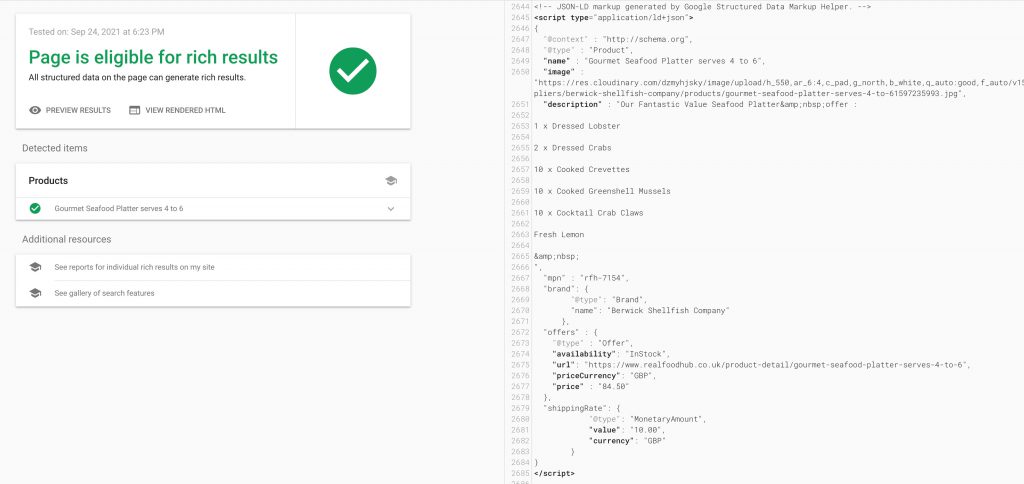
The results page will then confirm whether your Page is eligible for Rich results and outline any existing Rich results on your page.

How can I implement Google Rich Results for my website

Google uses structured data to understand the content on your web pages. Their recommended format is JSON-LD but you can also use Microdata or RDFa.

Entrust the task of implementing structured data to a dedicated web team so they can manage and oversee all aspects of the task. This will help ensure that it is implemented and applied correctly and within the specifications laid by Google. As incorrectly setup structured data could have a negative effect on your SEO strategy.

If you require assistance in setting up Google Rich Results for your website please Contact Us.